Database of sensory characteristics of older persons and persons with disabilities
National Institute of Advanced Industrial Science and Technology (AIST)
Japanese
Colour combinations based of fundamental colours
How to use this database
Parameters
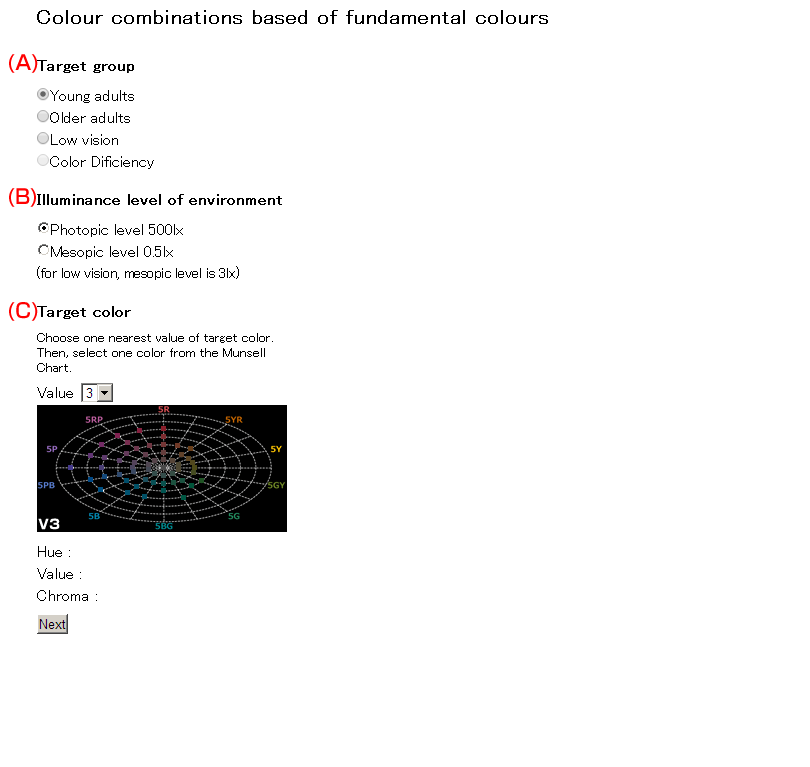
- (A)Target Group
-
Select one group to whom you would like to consider
* Low vision:In addition to definition of WHO, including the person who declined visual function and impossible to improve the functions with correction.
- (B)Illuminance level of Environment
-
Illuminance level of Environment
*Mesopic level:for Older and young adults:0.5lx, for low vision: 3 lx
- (C)Target Color
- Choose one nearest value of target color. Then, select one color from the Munsell Chat. Press “Next”button.
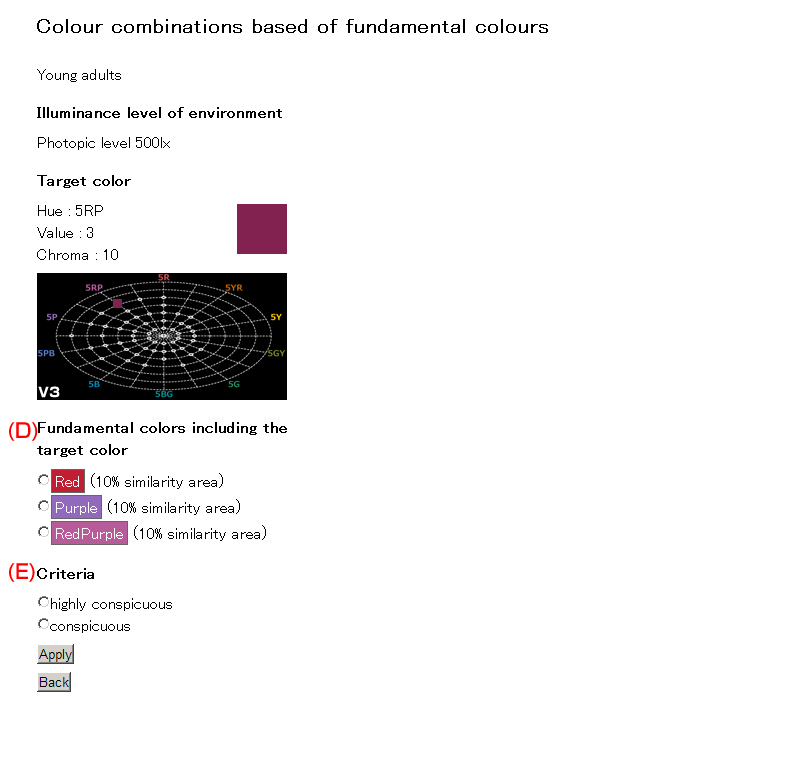
- (D)Fundamental colors including the target color
-
Fundamental colors which include the target color are presented. Please select one fundamental color. Similarity means that how the target colors similar to that fundamental color. If similarity is 50%, then more than half of the people judged that selected color is similar to that fundamental color.
There are 16 fundamental colors as follows;
1)Red[R] 5R4/14 2)Red[R] 5R5/12 3)Yellow Red [YR] 5YR5/10 4)Yellow Red [YR] 5YR7/12 5)Yellow[Y] 5Y5/6 6)Yellow[Y] 5Y8/12 7)Green Yellow[GY] 5GY5/8 8)Green [G] 5G5/8 9)Blue Green [BG] 5BG5/8 10)Blue [B] 5B5/8 11)Purple Blue [PB] 5PB5/10 12)Purple [P] 5P5/10 13)Red Purple [RP] 5RP5/10 14)Black[BLK] N1.0 15)Gray[GRY] N5.0 16)White[WHT] N9.5 - (E)Criteria
- Choose one criterion to judge similarities between target color and the color to be obtained as the combinations of target color.
Output
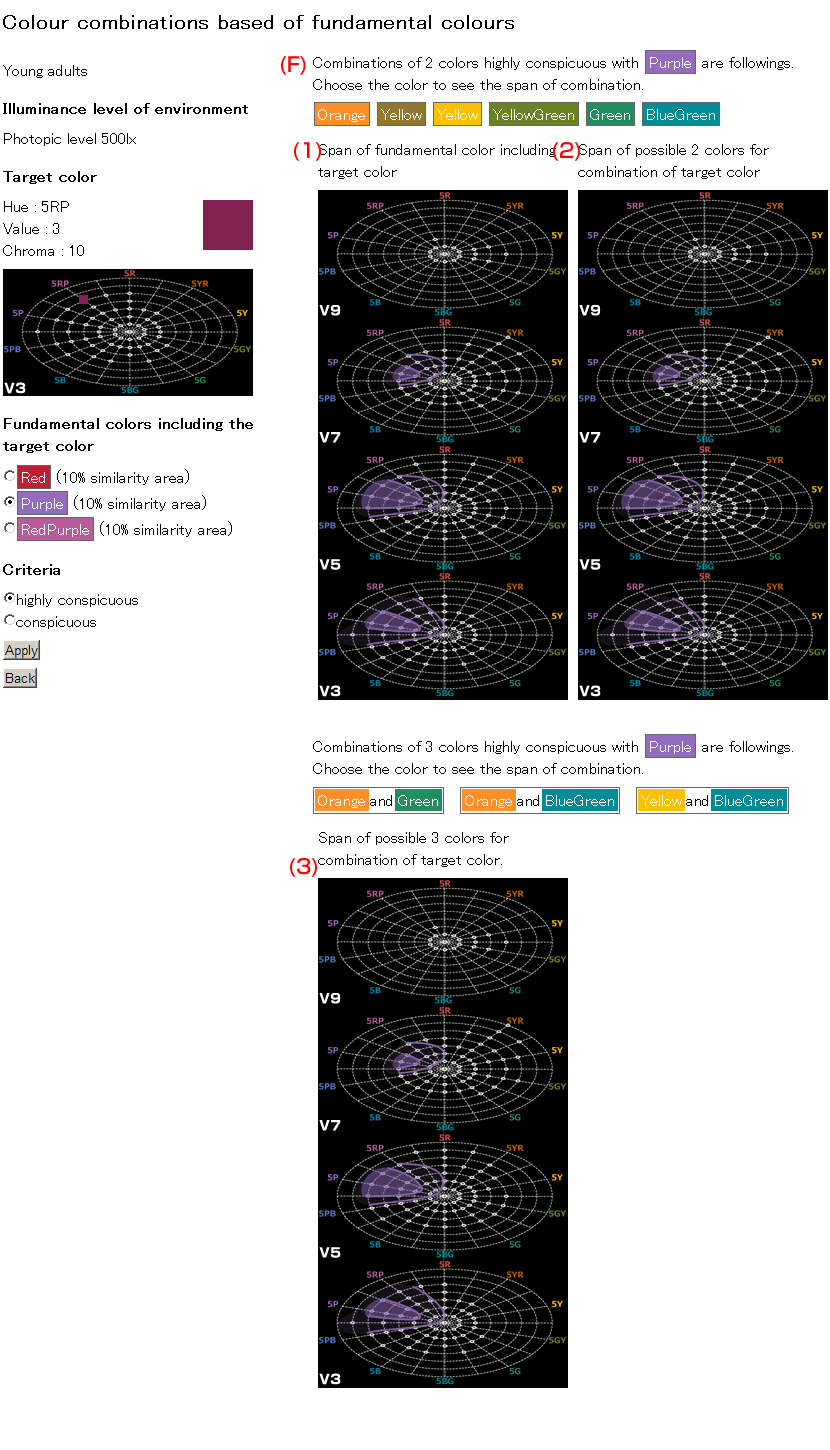
- (F)Recommended color combinations according to selected criterion
- This page shows the span of fundamental color of selected color.
First, the possible combination colors are shown in radio button. Choose one fundamental color.- (1)Span of fundamental color including target color
- This shows the span of fundamental color of target color.
- (2)(3)Span of possible 2 or 3 colors for combination of target color
- Choose one color by pressing one of the radio button, then it shows the span of that color. When select one color for combination color of the target color, please pick up colors within the colored area(50% similarity area).
Lines shows the span of 10% similarity and colored area shows the span of 50% similarity area of that fundamental color.
About this database
The data used in this database is based on the Japanese Industrial Standard, JIS S 0033: 2006 " Guidelines for the elderly and people with disabilities -- Visual signs and displays -- A method for colour combinations based on categories of fundamental colors as a function of age"
ISO 24505-1:2025 Ergonomics — Accessible design Part 1: Colour combinations for young and older people without visual impairments, and
ISO 24505-2:2025 Ergonomics — Accessible design Part 2: Colour combinations for people with colour deficiency and low vision.
